How to Register as a User (Member)
Registering as a user allows you to book appointments, choose the right barber, and manage your bookings easily.
Step 1: Open the Registration Page
From the top navigation bar, click Register to go to the new account page.
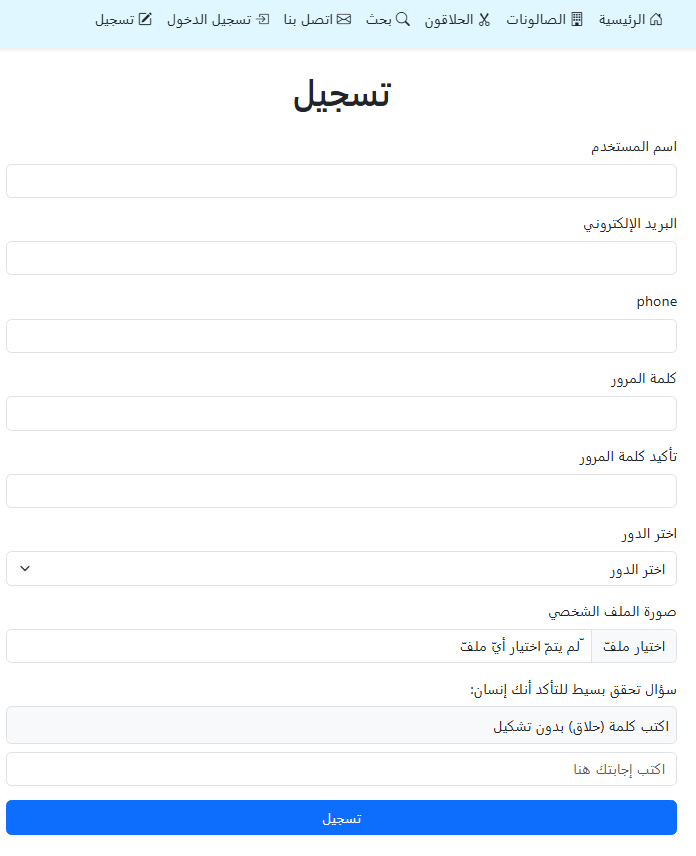
Step 2: Fill in Your Registration Details
Complete the following fields:
- Username
- Email address
- Phone number
- Password and confirmation
- Upload a profile photo (optional)
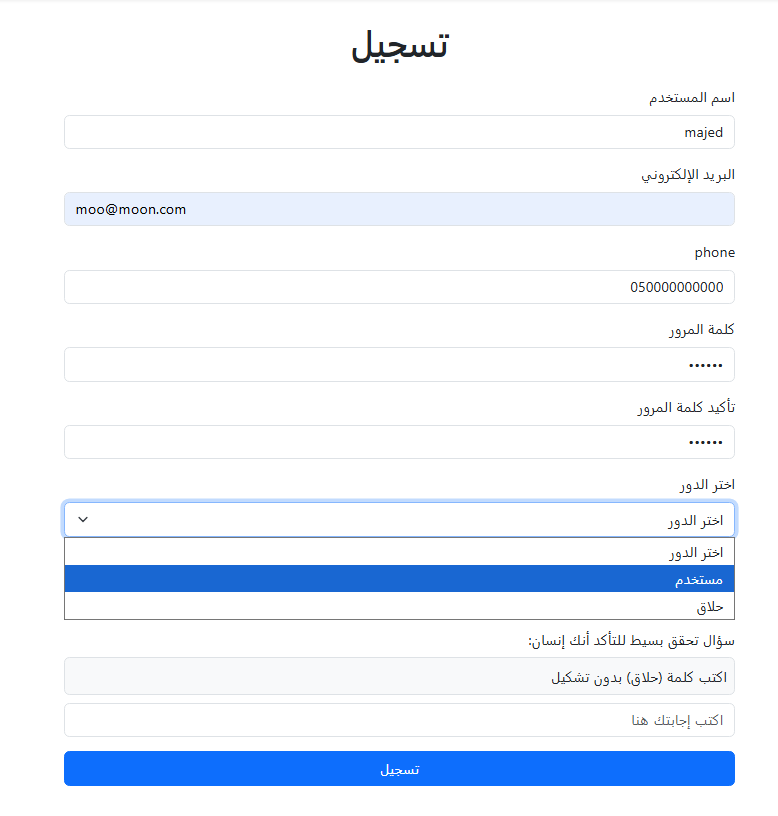
Step 3: Select the Role (User)
From Select Role, choose User. This option is for people who only want to book appointments.
⚠️ Choosing Barber has different steps and is explained in a separate guide.

Step 4: Verification and Submit
Answer the simple verification question to confirm you are human, then click: Register.
Step 5: Activate Your Account via Email
After successful registration, an activation message will be sent to your email.
- Open your email inbox
- Click the activation link
- You may find the email in Spam

✅ After activation, you can log in and start booking appointments immediately.
What can you do after registering?
- Browse salons
- Choose the right barber
- Book an available time
- Review barbers after the appointment